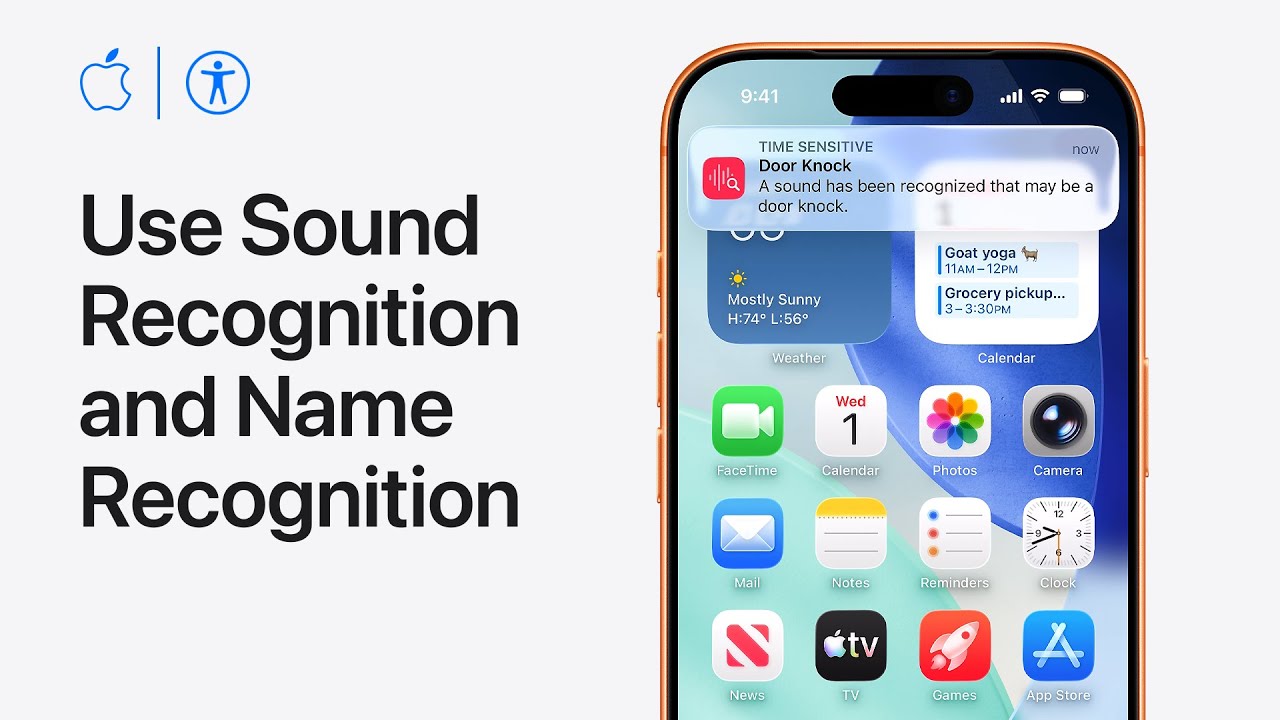
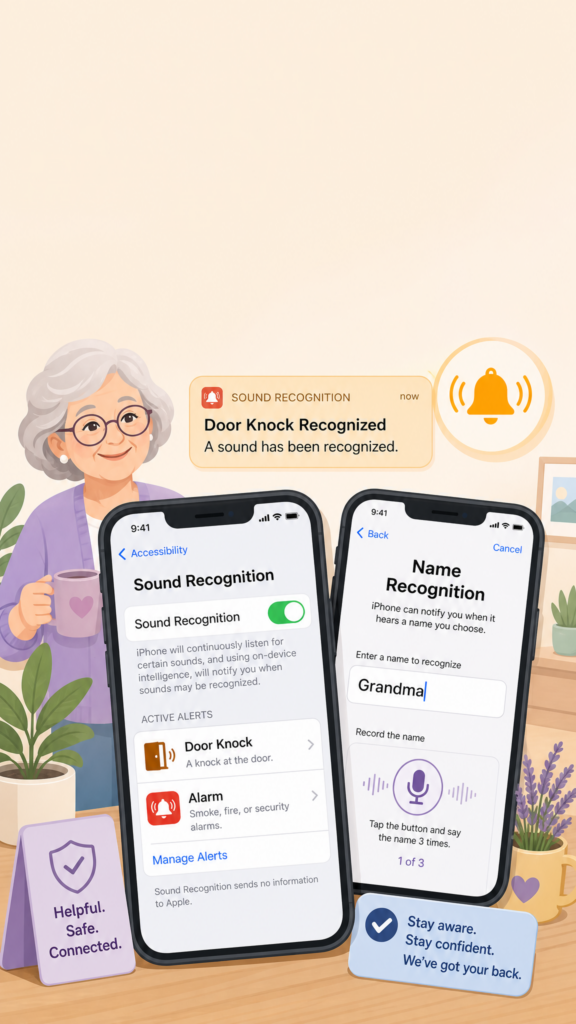
I’ll show you how to set up Sound and Name Recognition on your iPhone. Start by opening Settings, choose Accessibility, then select Sound & Name Recognition.
Tap Sound Recognition, toggle it on, and wait for your device to download the available sounds. Tap Sounds, choose an alert like Door Knock, turn on recognition for that sound, and select a preferred Alert Tone.
Next, go back and tap Name Recognition to set up alerts for when your name is spoken aloud.
Tap Set Up Name Recognition, type your name, and record your pronunciation three times when prompted to finish the process.
Open Settings → Accessibility → Sound & Name Recognition to begin customizing your alerts.
Turn on Sound Recognition and choose the specific sounds you want your iPhone to listen for, like alarms or door knocks.
Set up a custom alert tone and haptics to play immediately whenever your device recognizes a selected sound.
Tap Name Recognition inside the same settings menu and type your preferred name to start personalizing vocal alerts.
Record your own voice pronouncing your name three times when prompted to complete the setup process.
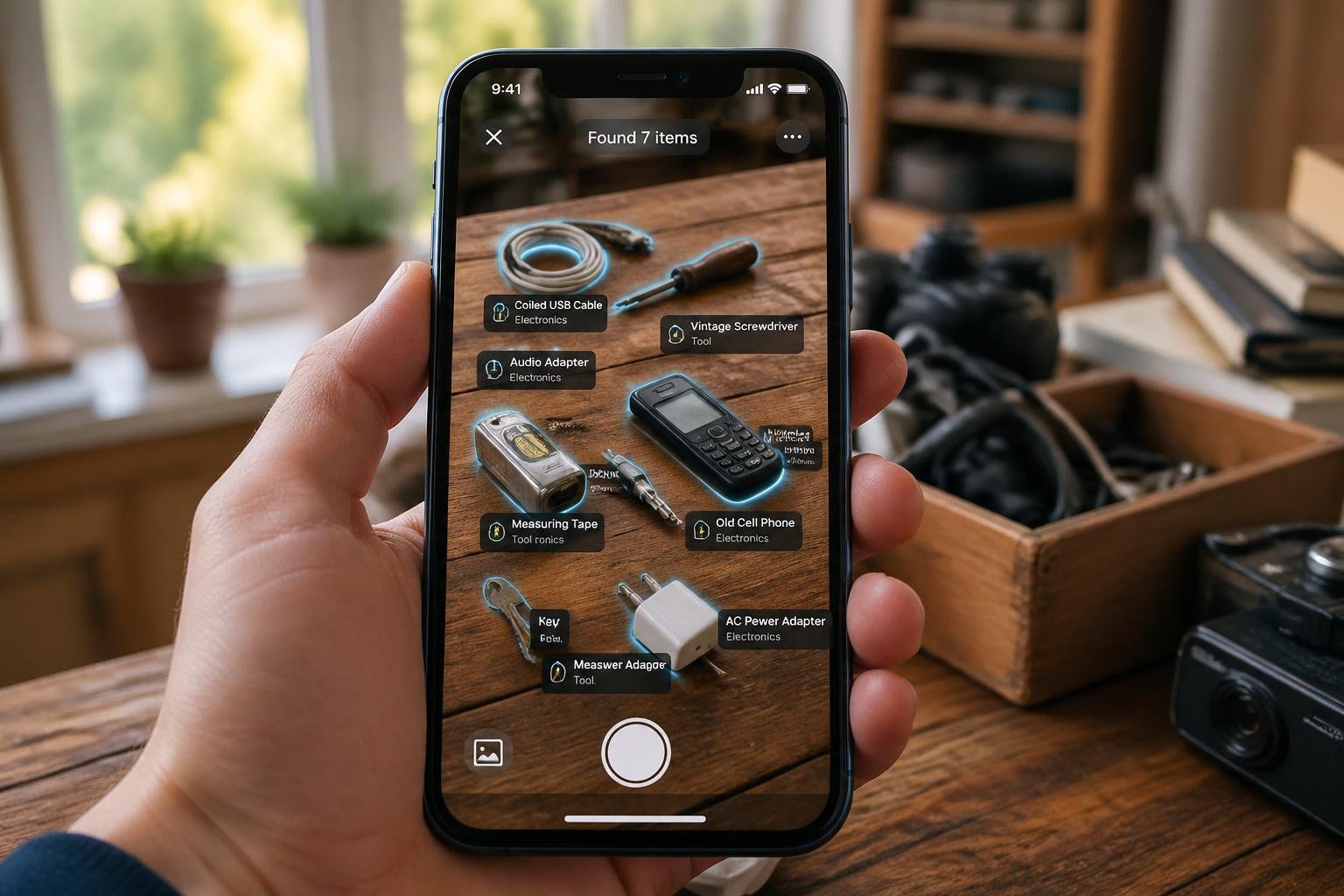
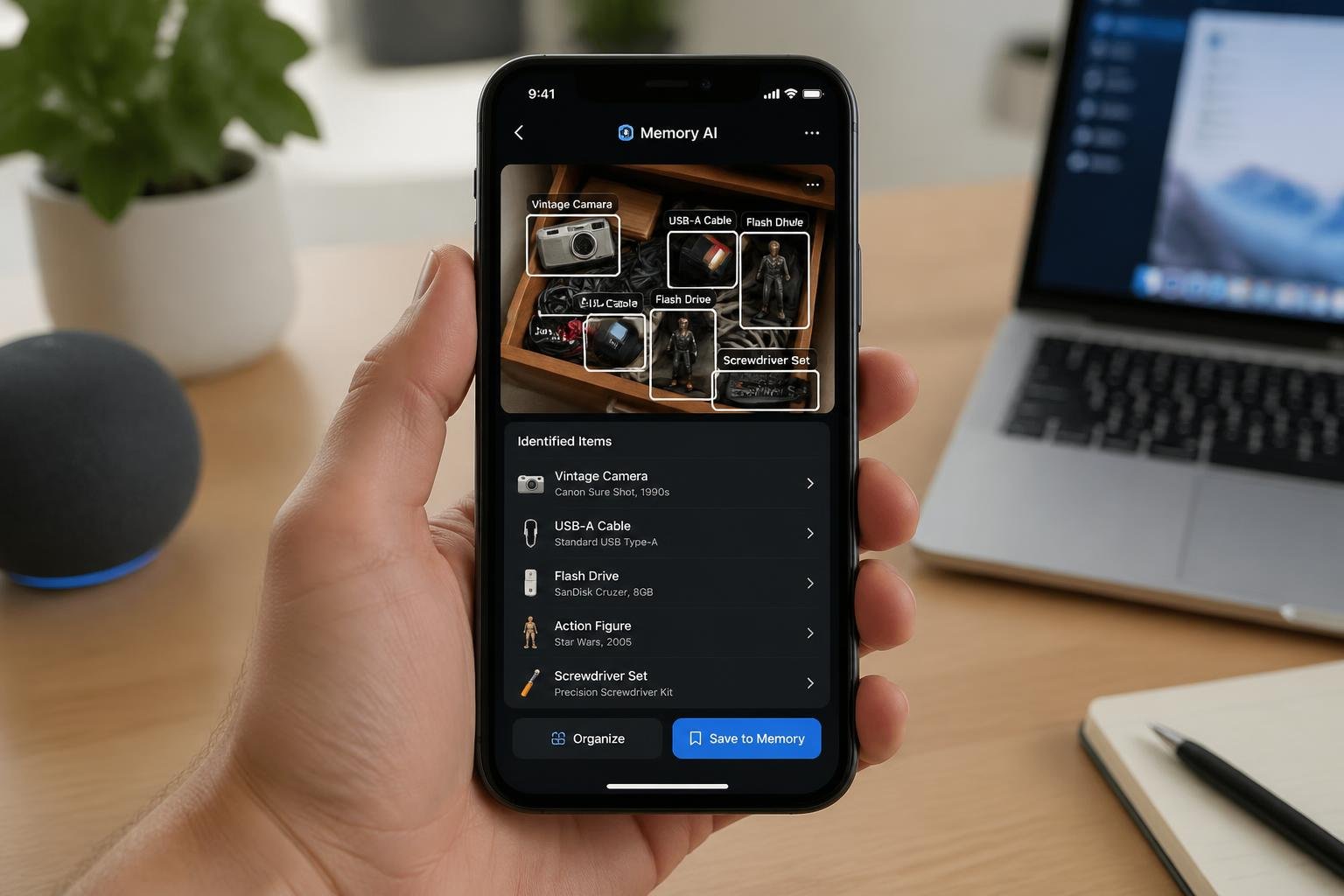
We’ve all been there—opening a drawer or closet only to find a tangle of mysterious cables, old chargers, and gadgets we can’t quite identify anymore. Is that cable for an old phone, a camera, or something that’s long been recycled? With iOS 18 and Apple Intelligence, iPhone users can now point their camera at these forgotten items and use Visual Intelligence to identify them instantly, making decluttering decisions much easier. This AI-driven feature transforms the iPhone camera into a practical tool for sorting through tech clutter without the guesswork.
Visual Intelligence works by analyzing objects through the camera and providing information about what they are, what they connect to, or how they’re used. Instead of keeping mystery cables “just in case,” users can quickly determine if an item is still needed or safe to discard. The feature is available on compatible iPhone models and integrates seamlessly with the device’s existing camera interface.
This capability goes beyond simple curiosity. It helps people make informed decisions about what to keep, donate, or throw away, reducing unnecessary clutter while avoiding the risk of accidentally discarding something important. Understanding how to use this feature effectively can streamline the decluttering process and bring clarity to those messy tech drawers.
Visual Intelligence on iPhone uses AI to identify unknown cables, tools, and gadgets through the camera
The feature helps users make confident decluttering decisions by providing instant information about forgotten items
Setting up and using Visual Intelligence is straightforward on compatible iPhones running iOS 18 with Apple Intelligence enabled
Setting Up AI-Driven Camera Features on iPhone
Before using Visual Intelligence to identify forgotten cables and gadgets, users need an iPhone 16, iPhone 16 Plus, iPhone 16 Pro, iPhone 16 Pro Max, iPhone 16e, iPhone 15 Pro, or iPhone 15 Pro Max running iOS 18.2 or later. The setup process requires enabling Apple Intelligence and configuring Visual Intelligence access through Camera Control or alternative methods.
Compatible iPhone Models and iOS Versions
Visual Intelligence works exclusively on specific recent iPhone models. The iPhone 16, iPhone 16 Plus, iPhone 16 Pro, and iPhone 16 Pro Max all support this feature. The iPhone 16e also includes compatibility, as do the iPhone 15 Pro and iPhone 15 Pro Max.
Users must have iOS 18.2 or higher installed on their device. Earlier versions like iOS 18.1 do not include Visual Intelligence capabilities. Apple Intelligence features began rolling out with iOS 18.1, but Visual Intelligence arrived specifically in iOS 18.2. Later updates including iOS 18.3 and iOS 18.4 continue to support and refine these features.
Older iPhone models, including standard iPhone 15 variants and earlier generations, cannot access Visual Intelligence regardless of software version. The hardware requirements limit this feature to Pro models from the iPhone 15 generation and all variants of the iPhone 16 lineup.
Updating and Enabling Apple Intelligence
Users should navigate to Settings > General > Software Update to check their current iOS version. The screen displays either confirmation that the OS is up to date or prompts installation of the latest update. Installing the update requires adequate battery life and storage space.
Apple Intelligence enables automatically as of iOS 18.3 for compatible devices. Users who previously disabled it need to open Settings > Apple Intelligence & Siri and toggle on the switch next to Apple Intelligence. Without this enabled, Visual Intelligence remains inaccessible even on compatible hardware.
The Apple Intelligence framework powers Visual Intelligence alongside other AI features. This system integrates with Siri and various camera functions to provide object recognition, text analysis, and search capabilities.
Activating Visual Intelligence and Camera Control
On iPhone 16, iPhone 16 Plus, iPhone 16 Pro, and iPhone 16 Pro Max models, users activate Visual Intelligence by pressing the Camera Control button. This dedicated button provides the quickest access method for identifying unknown items.
Users need to verify Visual Intelligence is enabled under Settings > Camera > Camera Control. Scrolling to the Launch Visual Intelligence section reveals a Press and Hold toggle that must be enabled.
The iPhone 16e, iPhone 15 Pro, and iPhone 15 Pro Max lack Camera Control buttons. Users with these models can customize the Action button to start Visual Intelligence instead. Alternative options include adding Visual Intelligence to the Lock screen or placing it in Control Center using the Add a Control option.
Using Visual Intelligence to Identify Forgotten Items
Visual Intelligence on iPhone 16 and later models transforms the camera into a powerful identification tool through the Camera Control button. This AI-powered feature connects to ChatGPT and Google Search to help users identify mysterious cables, dusty tools, and forgotten gadgets found during decluttering sessions.
How to Scan Old Cables, Tools, and Gadgets
To activate Visual Intelligence, users press and hold the Camera Control button on their iPhone 16. The camera viewfinder opens in a special mode designed for object recognition. Once activated, users simply point the camera at the unknown item without taking a photo.
The system works in real time, analyzing what the camera sees. For best results, users should ensure good lighting and position the entire object within the frame. The AI examines shapes, connectors, labels, and distinctive features to determine what the item is.
Visual Intelligence excels at identifying common household items like proprietary charging cables, specialized screwdriver bits, and vintage electronics accessories. The feature also works well with partial labels or manufacturer logos visible on old gadgets. Users can hold the camera steady for a few seconds to allow the system to gather sufficient visual information for accurate identification.
Leveraging ChatGPT and Google Search for Object Identification
When users activate Visual Intelligence on an unidentified item, the interface presents multiple search options. Google Search provides product matches, similar images, and shopping results that help identify common cables and tools. ChatGPT offers conversational analysis, explaining what an item might be based on its physical characteristics.
For obscure items, ChatGPT can answer follow-up questions about potential uses or compatibility. Users might ask “What devices use this type of connector?” or “Is this cable still useful?” The AI draws from its knowledge base to provide context about older technology standards and adapters.
Google Search proves particularly effective for items with visible brand names or model numbers. It returns product listings, user manuals, and technical specifications. Users can tap search results to open findings in Safari for detailed research. This combination of visual recognition and web search eliminates guesswork when sorting through boxes of accumulated tech accessories.
Utilizing Summarize, Translate, and Read Aloud Features
Visual Intelligence includes text recognition capabilities useful for items with foreign-language labels or technical specifications. The translate text function converts manufacturer information, warning labels, or instruction text into English instantly. Users point the camera at printed text on packaging or product surfaces to access translation.
The summarize feature condenses lengthy technical descriptions into key points. When Visual Intelligence identifies an item and pulls up detailed specifications, users can request a summary to quickly understand the essential information. This helps determine whether to keep or discard specialized tools and cables.
The read aloud function supports users who prefer auditory information. After identifying an object, the system can vocalize product details, compatibility information, or usage instructions. This feature works similarly to how it handles text from documents, making the decluttering process more accessible while users sort through physical items hands-free.
Beyond Identification: Decluttering and Taking Action
Once Visual Intelligence identifies forgotten gadgets and cables, users can leverage additional iPhone features to research products, schedule disposal tasks, and order replacements. The camera-based AI system connects directly to practical actions like checking store hours, creating reminders, and contacting services.
Creating Calendar Events from Gadget-Related Flyers
When users point their iPhone camera at product manuals, warranty cards, or gadget-related flyers during decluttering, Visual Intelligence can extract dates and event information. The system recognizes text on physical documents and offers to create calendar events for warranty expiration dates, service appointments, or recycling events.
Users can create calendar events directly from detected text without manual typing. For electronics recycling events or special collection days advertised on flyers, the camera captures the date and location details. The iPhone then prompts users to create an event with pre-filled information.
This feature proves particularly useful when sorting through old tech accessories with limited-time trade-in offers or scheduled electronics disposal days. Users maintain organization while decluttering by immediately scheduling follow-up actions rather than setting items aside with vague intentions to deal with them later.
Accessing Product Info and Making Decisions
Visual Intelligence connects to product databases and reviews when users photograph unidentified gadgets or cables. The camera analyzes the item and retrieves contact information, reviews, and hours of operation for retailers or manufacturers.
When examining an old device, users access specifications, original pricing, and current resale values. This information helps determine whether an item merits keeping, selling, or recycling. The system can pull up manufacturer details and support documentation for obscure accessories.
Users also check compatibility information for cables and adapters they’ve rediscovered. Apple Maps integration provides directions to nearby electronics recyclers or retailers that accept trade-ins, along with their hours of operation. Reviews help users select reputable recycling services or second-hand marketplaces.
Making Reservations, Orders, or Deliveries When Relevant
After identifying missing or outdated cables and accessories, users can make reservations at Apple Store Genius Bars or order replacement items. Visual Intelligence recognizes products and links to purchasing options or service booking.
The camera-based system allows users to order items directly when they identify a needed cable or adapter. For products requiring professional assessment, users can make reservations at service centers through integrated booking features.
When decluttering reveals items for donation or specialized disposal, users can request deliveries from pickup services or schedule appointments. The iPhone streamlines the entire process from identification through final action, eliminating the paralysis that often stalls decluttering projects.
Tips, Limitations, and Privacy Considerations
Visual Intelligence performs best under specific conditions and requires awareness of how Apple handles image data. Users should also understand how it compares to established alternatives like Google Lens.
Improving Accuracy for Object Recognition
Clear lighting and steady positioning significantly impact recognition accuracy when identifying forgotten cables or gadgets. Users should hold the iPhone steady and ensure objects are well-lit, avoiding shadows or glare that might obscure identifying features like connector types or brand logos.
Close-up shots work better than distant ones for small items like USB adapters or proprietary charging cables. The Camera Control button should be pressed and held until Visual Intelligence activates, allowing the system to capture enough detail for accurate identification.
Complex or heavily worn items may require multiple attempts from different angles. If Visual Intelligence struggles to identify a specific cable type, users can try photographing any visible text, part numbers, or distinctive physical features separately. The tool works more reliably with common consumer electronics than with specialized industrial tools or obscure vintage components.
Understanding Data Privacy and On-Device Processing
Apple processes some Visual Intelligence requests directly on the device, while others require server communication. Image analysis happens locally when possible, but searches through Google or queries to ChatGPT send data externally.
Users concerned about privacy should note that Apple does not store images sent for processing, according to their documentation. However, third-party services like Google and ChatGPT follow their own privacy policies when Visual Intelligence routes requests to them.
No explicit opt-out exists for Visual Intelligence data processing beyond disabling the feature entirely. The Camera Control button won’t activate Visual Intelligence unless deliberately pressed and held, preventing accidental data transmission.
Comparing Apple Visual Intelligence with Google Lens
Google Lens has existed longer and generally recognizes a broader range of objects, including obscure cables and vintage electronics. Visual Intelligence integrates more seamlessly within the iPhone ecosystem but offers fewer identification options for specialized hardware.
Both tools can identify common cables like Lightning, USB-C, and HDMI connectors. Google Lens typically provides more detailed product information and shopping links, while Visual Intelligence focuses on quick factual identification and integration with ChatGPT for explanations.
iPhone 16 models require iOS 18.2 or later, accessible through Settings > General > Software Update. Users with older iPhones must rely on Google Lens as a standalone app, which works across both iOS and Android devices.
Final Thoughts
Sorting through a “junk drawer” full of mystery cables and forgotten gadgets no longer has to be a guessing game. By using the AI-powered Visual Intelligence on your iPhone, you can transform your camera into a smart assistant that identifies exactly what those items are and whether you still need them. This technology takes the stress out of decluttering, helping you clear out digital and physical “noise” while ensuring you don’t accidentally toss something important.
As you begin your next cleanup, think of your iPhone not just as a phone, but as a high-tech magnifying glass. With a quick press of a button, you can move from confusion to confidence, making informed decisions that lead to a more organized and stress-free home. Decluttering is as much about mental clarity as it is about physical space—so let AI do the heavy lifting and enjoy the peace of mind that comes with knowing exactly what’s in your drawers.
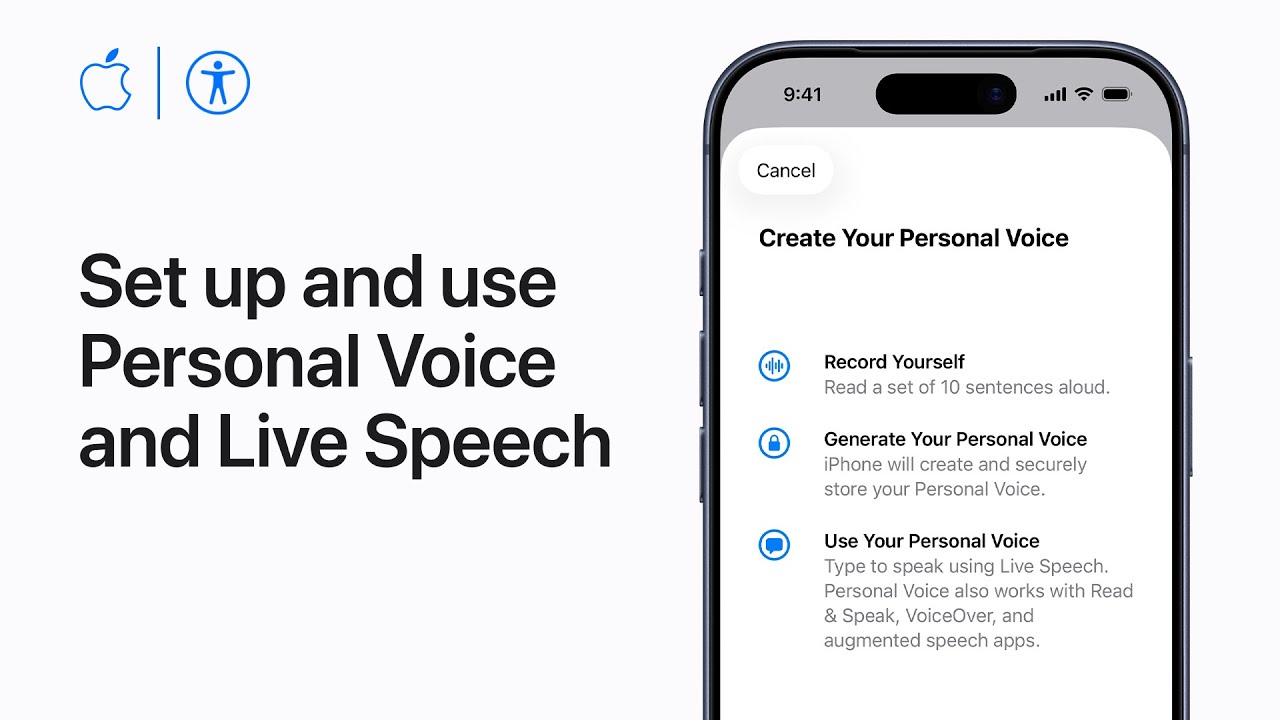
I’ll show you how to create a Personal Voice and use Live Speech on iPhone. First, update iOS and find Personal Voice in Settings → Accessibility, then tap Create a Personal Voice and authenticate.
Record prompted phrases in a quiet room, use Recording or Stop at Each Phrase if needed, and preview recordings. After processing, add your Personal Voice to Live Speech under Accessibility → Live Speech.
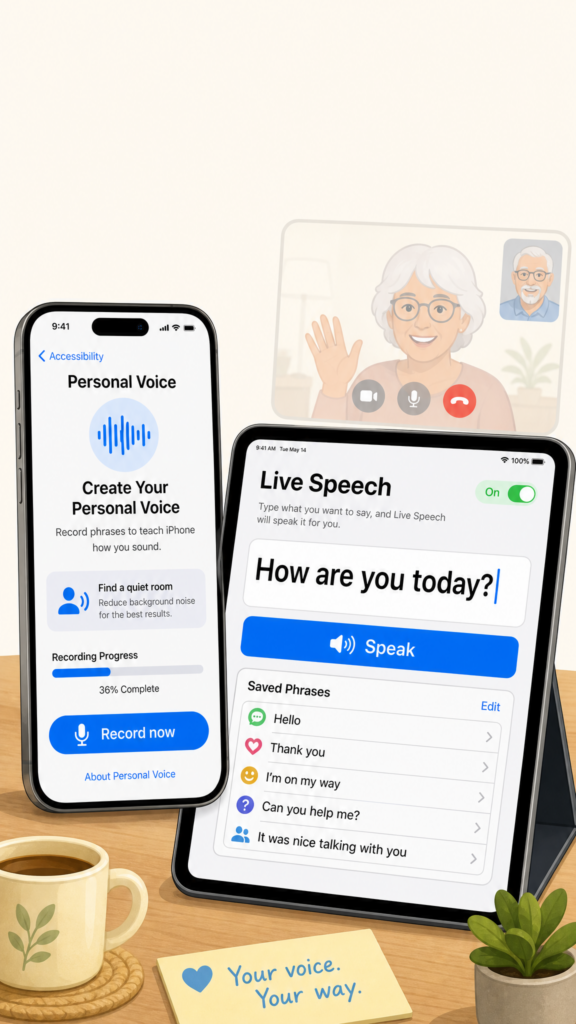
Turn on Live Speech, add it to Control Center or Accessibility Shortcut, and save common phrases.
During conversations triple‑click the side/top button, type or pick a phrase, then tap Speak to speak aloud.
Update iOS, open Settings → Accessibility → Personal Voice, and authenticate to begin.
Record prompted phrases in a quiet room; preview and resume later if needed.
Let the device process recordings, then add that Personal Voice to Live Speech.
Enable Live Speech, add it to Control Center or Accessibility Shortcut, and store common phrases.
During conversations triple‑click the side/top button, type or select a saved phrase, and tap Speak.
Your phone likely holds thousands of photos you’ll never look at again, apps gathering digital dust, and countless screenshots that served their purpose months ago. AI-powered tools can automatically scan your device to identify blurry images, duplicate photos, forgotten apps, and unnecessary files that waste storage space and create mental clutter. This technology uses pattern recognition and usage data to pinpoint what’s worth keeping and what’s simply taking up room.
Digital clutter accumulates faster than most people realize. A camera roll filled with near-identical shots, apps downloaded once and abandoned, and screenshots saved “just in case” add up to gigabytes of wasted space. AI decluttering tools analyze image quality, detect duplicates, track app usage patterns, and flag files that haven’t been accessed in months or years.
The result goes beyond just freeing up storage. A cleaner digital environment reduces the time spent scrolling through irrelevant content and makes it easier to find what actually matters. Modern AI solutions can perform these tasks in minutes, transforming an overwhelming cleanup project into a manageable process.
Key Takeaways
AI tools automatically detect blurry photos, duplicate images, and apps unused for extended periods to free up storage space
Digital decluttering improves device performance and reduces the mental load of managing excessive files
Regular maintenance using AI-powered cleanup features prevents clutter from accumulating and keeps devices organized
How AI Identifies Unwanted Photos and Unused Apps
AI analyzes visual quality metrics, file metadata, and usage patterns to automatically flag photos and apps that consume storage without adding value. These systems use machine learning models trained on millions of examples to distinguish between keepers and digital clutter.
Detecting Blurry Photos Automatically
AI examines sharpness levels by analyzing edge contrast and pixel gradients across an image. When edges appear soft or undefined, the algorithm calculates a blur score that indicates whether the photo fails to meet quality thresholds.
The technology processes these measurements in milliseconds per image. Apps like Photo Sniff use this AI-powered detection to scan entire libraries and identify blurry images alongside duplicates and screenshots. The system compares each photo against learned standards of acceptable sharpness, flagging images that fall below the threshold without requiring manual review.
Finding Redundant Screenshots
AI recognizes screenshots through distinctive patterns in metadata, pixel arrangements, and UI elements. Screenshot files typically contain uniform edges, system interface components, and specific aspect ratios that match device screen dimensions.
The detection process identifies characteristics like status bar icons, navigation buttons, and timestamp overlays common to mobile operating systems. AI models trained on iOS and Android interface elements can distinguish screenshots from photographs taken with a camera, even when users capture images of screens.
Recognition extends to platform-specific apps including Instagram and other Meta properties, where screenshots of posts, stories, or messages display telltale interface markers. The AI flags these files as temporary captures that users often forget to delete after sharing or reference.
Spotting Apps That Haven’t Been Opened in a Year
AI monitors application launch timestamps stored in system logs to track usage frequency. When an app remains unopened beyond a specified period, typically 365 days, the system flags it as a candidate for removal.
The analysis considers:
Last opened date from system metadata
Installation date versus usage history
Storage space consumed relative to use frequency
Background activity patterns
Mobile operating systems maintain detailed records of when users interact with each application. AI algorithms parse this data to generate recommendations, prioritizing large apps with zero recent activity. The technology accounts for seasonal apps or utilities that serve specific purposes, allowing users to review suggestions before deletion rather than removing apps automatically.
Benefits of Reducing Digital Clutter
Eliminating unnecessary digital files and applications frees up valuable storage, speeds up device operations, and creates a calmer digital environment that supports better focus and productivity.
Saving Storage Space Efficiently
Digital clutter accumulates quickly across devices, particularly when users store thousands of photos from platforms like Instagram or other Meta applications. Screenshots, duplicate images, and blurry photos often consume gigabytes of storage without serving any practical purpose.
AI-powered cleanup tools can identify and remove these space-wasting files automatically. A typical smartphone user might discover hundreds or even thousands of redundant files during a single scan. This recovered storage allows devices to function properly and provides room for content that actually matters.
Cloud storage costs add up when users pay for additional capacity to house digital waste. By removing unnecessary files, users can downgrade to lower-tier storage plans or avoid upgrades entirely. The financial savings from reduced cloud subscriptions make regular digital decluttering a practical investment.
Improving Device Performance
Excessive files and unused applications slow down devices by consuming processing power and memory resources. Apps running in the background drain battery life and reduce available RAM, even when users haven’t opened them in months.
Removing applications that haven’t been used in a year immediately frees up system resources. Devices boot faster, apps launch more quickly, and overall responsiveness improves noticeably. This performance boost extends device lifespan and delays the need for hardware upgrades.
Storage drives perform better when they aren’t operating near full capacity. Devices need adequate free space to manage temporary files, install updates, and run applications smoothly. Maintaining at least 10-15% free storage ensures optimal device performance and prevents system slowdowns.
Decreasing Mental Distraction
Digital clutter creates fragmented attention and increases stress levels during daily device use. Users waste time scrolling through disorganized photo libraries or searching for specific files among thousands of unnecessary items.
A clean digital environment reduces cognitive load and decision fatigue. When users open their devices and see organized, relevant content instead of chaos, they can focus on tasks more effectively. This clarity translates to improved productivity and reduced frustration.
Removing visual noise from devices creates a more intentional relationship with technology. Users who regularly declutter their digital spaces report feeling more in control of their devices rather than overwhelmed by them. This mental benefit often proves more valuable than the storage savings alone.
Step-by-Step Guide to Starting Your Digital Declutter
A successful digital declutter begins with clear objectives, followed by a thorough review of storage-heavy items like photos and apps, then implementation of AI-powered tools to automate the cleanup process.
Setting Clear Digital Organization Goals
Before diving into deletion mode, users should identify their specific pain points. Someone with 50,000 photos faces different challenges than someone with an overflowing email inbox or dozens of forgotten social media accounts.
The most effective approach involves a quick audit. Users can check storage settings on their devices to see what consumes the most space. Photos typically dominate phone storage, while computers often accumulate large files in downloads folders.
Closing dormant accounts requiring frequent log in attempts
Users should tackle one category at a time rather than attempting everything simultaneously. This prevents overwhelm and creates visible progress.
Reviewing Photos, Screenshots, and Apps
Photos and screenshots accumulate faster than most digital content. Many users discover thousands of duplicate images, blurry shots, and outdated screenshots when they finally review their galleries.
A manual review starts with sorting by date or album. Users should delete obvious candidates first: accidental shots, test photos, and screenshots of information no longer needed. Apps like Instagram often generate saved images that users forget about entirely.
For apps, the six-month rule applies effectively. Any app unopened in half a year likely serves no current purpose. Users can check app usage in their device settings to identify candidates for removal.
Deleting unused apps frees storage and reduces background processes that drain battery life. It also eliminates notification clutter from services rarely accessed.
Using AI Tools for Seamless Cleanup
Modern AI-powered tools automate much of the decluttering process. Google Photos and Apple Photos use machine learning to detect blurry images, duplicates, and screenshots automatically.
These platforms group similar photos together and suggest deletions based on quality metrics. Users can review AI recommendations in batches rather than scrolling through thousands of individual images.
AI assistants also identify:
Low-quality photos: Blurry, dark, or poorly composed shots
Exact duplicates: Multiple copies of identical images
Similar shots: Burst mode photos where one version suffices
Temporary screenshots: Receipts, directions, or memes saved temporarily
Third-party apps extend these capabilities across devices. They scan for large files, old downloads, and redundant documents without manual searching. Users simply review suggested deletions and approve removals with a few taps.
Best Practices for Maintaining a Clutter-Free Digital Life
Sustainable digital organization requires consistent habits rather than sporadic cleaning sessions. AI tools work most effectively when paired with regular maintenance schedules, mindful social media practices, and privacy-conscious deletion strategies.
Scheduling Routine AI-Powered Cleanups
Setting up automated AI scans on a weekly or monthly basis prevents digital clutter from accumulating to overwhelming levels. Most AI-powered cleaning tools allow users to schedule automatic photo analysis, duplicate file detection, and storage optimization during off-peak hours like overnight or during weekends.
Weekly cleanups should focus on recent screenshots, downloaded files, and temporary items that accumulate quickly. Monthly sessions can tackle larger tasks like analyzing app usage patterns or scanning photo libraries for blurry images. Quarterly reviews work well for comprehensive system-wide organization.
Recommended cleanup frequency:
Screenshots and downloads: Weekly
Duplicate photos and similar images: Bi-weekly
Unused apps and large files: Monthly
Complete system scan: Quarterly
Users should configure AI tools to notify them before automatic deletions occur. This review step ensures important files aren’t removed by mistake while still maintaining the efficiency of automated cleaning. Most platforms offer a 30-day retention period for deleted items, providing a safety net for accidental removals.
Integrating Decluttering With Social Media Usage
Social media platforms generate substantial digital clutter through cached data, saved posts, and downloaded media. Instagram stores temporary files each time users view stories, posts, or reels, which can consume several gigabytes over time.
AI-powered cleaners can identify and remove cached Instagram data without affecting saved posts or login credentials. Users should clear Instagram cache monthly through their device settings or dedicated cleaning apps. Meta’s family of apps, including Instagram from Meta, share similar cache management options in their settings menus.
Downloaded posts and stories represent another clutter source. AI tools can flag saved Instagram content that users haven’t accessed in months, prompting decisions about whether to keep these files. Setting a three-month rule for saved social media content helps maintain relevance.
Steps to reduce social media clutter:
Enable automatic cache clearing in app settings
Review saved posts monthly using AI sorting tools
Delete downloaded stories after viewing
Unfollow inactive accounts to reduce feed volume
Protecting Privacy While Managing Digital Footprints
AI cleaning tools require access to personal files, which raises legitimate privacy concerns. Users should verify that any AI decluttering service uses local processing rather than uploading files to external servers for analysis.
On-device AI processing keeps sensitive photos, documents, and messages private while still enabling intelligent organization. Services that offer end-to-end encryption provide additional security when cloud syncing is necessary. Users should read privacy policies to understand what data gets collected during AI scans.
Before using AI to clean social media-related files, individuals should consider which platforms have access to their data. Instagram and other Meta platforms already analyze user content for ad targeting, but third-party cleaning apps may introduce additional data collection. Choosing apps with transparent data policies minimizes these risks.
Regular privacy audits complement AI decluttering efforts. Users should review app permissions quarterly to revoke access for unused services. This practice reduces the number of applications that can create or access digital files, limiting future clutter sources while protecting personal information.
I’ll show you how to take a Hearing Test and set up the Hearing Aid feature using AirPods Pro 2+ with your iPhone.
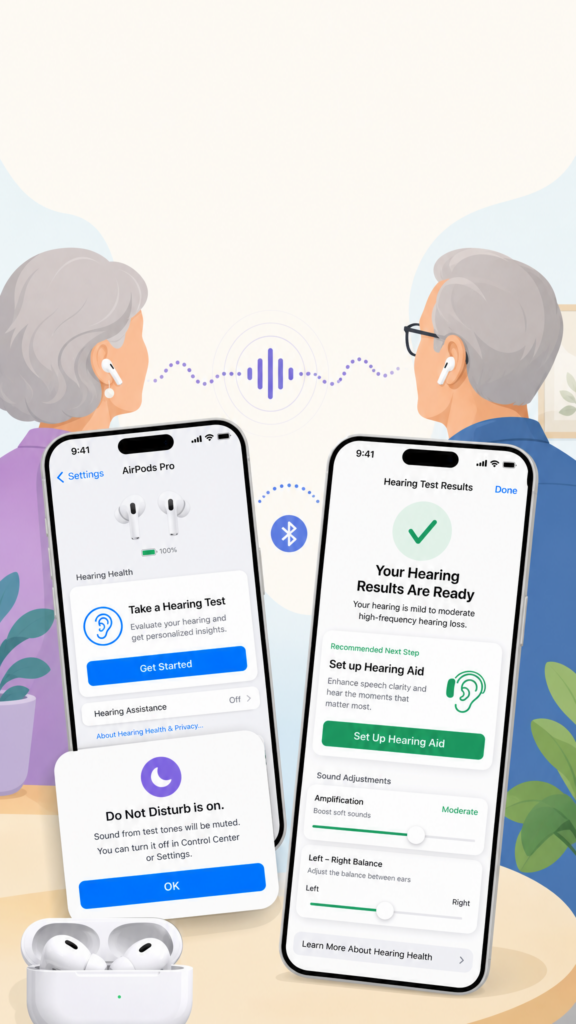
First, update iOS and AirPods firmware and wear your AirPods. In Settings tap your AirPods, choose Take a Hearing Test, then Get Started.
Follow prompts: answer questions, confirm you’re in a quiet location, and check fit; Do Not Disturb turns on automatically.
The test plays tones left then right—tap once when you hear each. After reviewing results, tap Set up Hearing Aid if recommended, follow the setup prompts, turn it on, then customize amplification settings, left‑right balance, and tone.
Update iOS and AirPods firmware, wear your AirPods.
In Settings → AirPods → Take a Hearing Test → Get Started and follow prompts (quiet location, fit).
Tap once when you hear each test tone; test runs left then right; Do Not Disturb turns on.
Review results and, if recommended, choose Set up Hearing Aid to begin setup.
Turn on Hearing Aid and fine‑tune amplification, left‑right balance, tone, and other adjustments.
I’ll show you how to set up Speak Selection on your Mac. Open System Settings, choose Accessibility, select Read and Speak, and turn on Speak Selection.
Click the Info button to customize the keyboard shortcut (default Option+Esc) and choose whether to highlight content—select Words and Sentences for word-by-word highlighting.
Choose word and sentence colors and switch Underline to Background Color to enable highlighting.
Set the Speak Selection controller to appear automatically or when you press the shortcut, click OK, open Pages, select text, and press the shortcut to have your Mac read it aloud and adjust settings as needed later.
Enable Speak Selection in System Settings → Accessibility → Read and Speak.
Open Info to set the keyboard shortcut (default Option+Esc).
Choose highlighting behavior: Words and Sentences for word-level highlighting.
Pick word and sentence colors and switch underline to Background Color to highlight as it reads.
Use the Speak Selection controller option, open a compatible app (Pages), select text, and press the shortcut to hear it.
The idea of a personal tutor available at any time, infinitely patient and capable of explaining concepts in multiple ways, was once a luxury reserved for the privileged few. AI tutoring systems have transformed this into a reality accessible to anyone with an internet connection. These platforms use adaptive learning technology to meet learners where they are, adjusting difficulty and pacing based on individual performance while providing the kind of judgment-free environment that encourages genuine engagement with challenging material.
AI tutors create psychologically safe learning environments where students can express confusion, ask clarifying questions, and articulate partial understanding without fear of judgment, responding with infinite patience to support continuous cognitive development. Unlike traditional classroom settings or even human tutoring sessions, these systems allow learners to engage with material at their own pace and time, seeking help when they feel ready. The technology goes beyond simple answer verification, offering naturalistic dialogue, contextually appropriate explanations, and sophisticated feedback that guides learners toward understanding rather than simply providing solutions.
Recent research demonstrates that well-designed AI tutoring platforms deliver substantial learning gains across various subjects while improving motivation and engagement. The key lies in pedagogically sound design that employs Socratic approaches, breaks down complex issues to manage cognitive load, and provides scaffolded content that guides learners through problems systematically. When choosing an AI tutor, understanding these design principles helps identify platforms that truly enhance learning rather than merely digitizing traditional instruction.
These platforms create judgment-free environments that encourage learners to ask questions and explore concepts without embarrassment
Effective AI tutoring systems use sound pedagogical design with Socratic questioning and scaffolded content rather than simply providing direct answers
Understanding AI-Powered Tutors and Adaptive Learning
AI-powered tutors represent a fundamental shift in how technology supports learning, using sophisticated algorithms to personalize instruction and adjust to individual capabilities. These systems combine multiple technologies to create responsive learning environments that mirror the patience and adaptability of human instruction without the limitations of static educational materials.
Defining AI Tutors and Their Core Technologies
AI tutors are intelligent software systems that guide learners through personalized educational experiences. These platforms analyze student responses, identify knowledge gaps, and adjust their teaching approach based on individual performance patterns.
Modern AI tutoring systems operate on several core technologies. Natural language processing allows students to interact conversationally with the system, asking questions in their own words rather than selecting from predetermined options. Machine learning algorithms track student progress across sessions, building detailed profiles of strengths and weaknesses. Computer vision capabilities enable some AI tutors to analyze handwritten work or observe problem-solving approaches.
The technology has evolved significantly from early rule-based systems. Contemporary AI tutors process complex data patterns to understand not just whether an answer is correct, but why a student might have made a particular error. This diagnostic capability allows the system to address underlying misconceptions rather than simply marking responses as right or wrong.
How Adaptive Learning Powers Individual Progress
Adaptive learning forms the backbone of effective AI tutoring by continuously calibrating difficulty and content to match student proficiency. The system monitors performance in real-time, adjusting the complexity of problems and explanations based on demonstrated understanding.
Key adaptive mechanisms include:
Dynamic content adjustment – The AI modifies explanation depth and problem difficulty based on success rates
Spaced repetition – Challenging concepts reappear at strategic intervals to strengthen retention
Learning path customization – Students progress through material at their own pace rather than following rigid timelines
Multi-modal presentation – Content is delivered through various formats (text, visual, interactive) based on engagement patterns
Research at institutions like UniDistance Suisse demonstrates measurable improvements when AI tutors implement retrieval-based practices and model student progress through neural networks. The systems identify when learners plateau and introduce alternative explanations or approaches to maintain forward momentum. Unlike static textbooks, adaptive AI platforms respond to confusion immediately, preventing students from practicing incorrect methods or building faulty understanding.
The Role of Large Language Models in Tutoring
Large language models have transformed AI tutoring from scripted interactions to fluid, context-aware conversations. These models process natural language with sophistication that allows students to ask follow-up questions, request different explanations, and explore tangential concepts without breaking the learning flow.
LLMs enable AI tutors to generate original explanations rather than retrieving pre-written responses from databases. This generative capability means the system can rephrase complex ideas in multiple ways until a student grasps the concept. The models understand context across extended conversations, remembering earlier questions and building on previous exchanges.
The technology supports Socratic-style dialogue where the AI asks guiding questions rather than simply providing answers. This approach encourages critical thinking and helps students develop problem-solving strategies. LLMs can also identify patterns in student questions that reveal deeper conceptual confusion, allowing the system to address root causes rather than surface-level symptoms.
Personalized and Patient Learning Experiences
AI tutors adjust their approach based on individual performance data, creating learning environments that match each person’s pace and style. These systems provide continuous feedback without the pressure or embarrassment that can accompany traditional learning settings.
Personalized Learning Paths Versus Traditional Methods
Traditional classroom instruction delivers the same content at the same pace to all students, regardless of individual needs. AI tutors analyze how a learner responds to questions and identifies knowledge gaps in real time.
The technology creates individualized learning paths by adjusting difficulty levels automatically. A student struggling with basic concepts receives additional practice problems at that foundational level. Someone who demonstrates mastery moves forward to more challenging material without waiting for others.
Research from UniDistance Suisse showed students using AI tutors achieved improvements of up to 15 percentile points compared to those without personalized support. The system generated practice questions from existing course materials and built dynamic models of each student’s understanding. This level of personalized learning addresses the practical constraints that make customized instruction difficult to implement at scale in traditional settings.
Progress Tracking and Instant Feedback
AI tutors monitor performance across every interaction, building detailed profiles of strengths and weaknesses. This progress tracking happens automatically without requiring manual assessments or waiting periods.
Immediate feedback helps learners correct misunderstandings before they become ingrained habits. When someone answers incorrectly, the system explains why and offers alternative approaches. This real-time feedback creates opportunities to adjust strategies during practice sessions rather than discovering errors days later on a graded test.
The tracking extends beyond simple right-or-wrong metrics. AI systems identify patterns in how learners approach problems, revealing whether someone needs more foundational work or simply struggles with specific question formats. Students can review their progress data to see measurable improvements over time, which reinforces continued engagement with the material.
Non-Judgmental and Self-Directed Skill Development
AI tutors eliminate the social anxiety that prevents many people from asking questions or admitting confusion. The technology provides a private space where learners control the pace without feeling rushed or embarrassed.
Self-directed learning becomes more accessible when individuals can practice skills on their own schedules. Someone wants to review a concept at midnight can access the same quality instruction as during traditional business hours. The system never expresses frustration with repeated questions or slow progress.
This patient approach particularly benefits adult learners who may feel self-conscious about returning to academic subjects after years away. The AI responds to the same question asked multiple times with identical patience, allowing thorough understanding without judgment. Users develop confidence through repeated practice in a supportive environment that adapts to their specific needs rather than forcing them into predetermined structures.
Choosing and Using AI Tutoring Platforms Effectively
Selecting the right AI tutoring platform requires evaluating features that match specific learning goals, while implementation strategies determine whether these tools deliver meaningful cognitive benefits. Access barriers continue to limit who can benefit from these technologies.
Popular AI Tutoring Platforms and Key Features
AI tutoring platforms vary significantly in their approaches and capabilities. Khan Academy’s Khanmigo offers subject-specific guidance across mathematics, science, and humanities with conversational explanations. Duolingo employs adaptive algorithms for language learning, adjusting difficulty based on user performance patterns.
Platforms like Socratic by Google specialize in homework assistance through image recognition and step-by-step problem breakdowns. Quizlet combines AI-generated practice questions with spaced repetition algorithms that schedule review sessions at optimal intervals for memory retention.
Key features to evaluate include:
Adaptive difficulty adjustment that responds to learner performance in real-time
Multi-modal explanations offering visual, textual, and interactive formats
Progress tracking with detailed analytics on strengths and weaknesses
Subject coverage ranging from narrow specialization to broad curriculum support
Cost structure including free tiers, subscriptions, or one-time purchases
Some platforms like Photomath focus exclusively on mathematics with camera-based problem recognition, while others such as ChatGPT-based tutors provide general assistance across disciplines. The effectiveness of each platform depends on matching its strengths to specific learning objectives.
Strategies for Exam Prep and Lifelong Learning
Exam prep benefits from structured AI tutor usage that mimics test conditions and identifies knowledge gaps. Learners should begin by taking diagnostic assessments offered by platforms to establish baseline understanding. AI tutors then generate personalized study plans targeting weak areas while maintaining proficiency in stronger subjects.
Spaced repetition proves particularly effective for memorization-heavy subjects. AI platforms automate this process by scheduling review sessions before information fades from memory. Users should trust these algorithms rather than cramming, as research demonstrates superior long-term retention.
For lifelong learning, consistency matters more than intensity. Setting specific daily or weekly goals—such as 20 minutes of practice—creates sustainable habits. Learners should actively engage with explanations rather than passively reading responses, asking follow-up questions when concepts remain unclear.
AI tutors work best as supplements rather than replacements for human instruction. They provide unlimited practice opportunities and immediate feedback that traditional methods cannot match. However, complex problem-solving and nuanced discussion still benefit from human expertise.
Ensuring Accessibility and Addressing the Digital Divide
The digital divide prevents many potential users from accessing AI tutoring platforms. Reliable internet connectivity remains unavailable in rural areas and lower-income communities, while device ownership creates additional barriers. Some platforms require modern smartphones or computers that budget-conscious families cannot afford.
Free platforms like Khan Academy reduce financial obstacles, though premium features often remain behind paywalls. Libraries and community centers can provide access points, offering computers and internet for public use. Educational institutions should evaluate platform compatibility with older devices and slower connections.
Language accessibility extends beyond translation features. AI tutors must accommodate different literacy levels, learning disabilities, and cultural contexts. Screen reader compatibility and keyboard navigation support users with visual or motor impairments.
Data privacy concerns disproportionately affect vulnerable populations who lack resources to monitor how platforms collect and use personal information. Users should review privacy policies and select platforms with transparent data practices, particularly when minors are involved.
Final Thoughts
Learning something new doesn’t have to feel overwhelming or intimidating. With AI tutors, you can take your time, ask as many questions as you need, and build your skills step by step in a comfortable, pressure-free way. Whether you’re exploring a new hobby like chess or simply keeping your mind active, these tools can meet you where you are and grow with you. The key is to stay curious and consistent. Even a few minutes a day can make a difference. With the right support, learning can become enjoyable again—and something you truly look forward to.
I’ll show you how to set up and use Read & Speak on your iPhone or iPad:
First, open Settings, tap Accessibility, then Read & Speak and enable Speak Selection.
Next choose Highlighting to set the style and color for spoken text, then return to download different Voices or change the Default Language while leaving Detect Languages on for automatic detection.
Tap Pronunciations to correct tricky words and adjust the Speaking Rate slider to slow or speed the voice.
To use it, select text in compatible apps, tap the arrow until Speak appears, then tap Speak to hear the text aloud for clearer comprehension quickly.
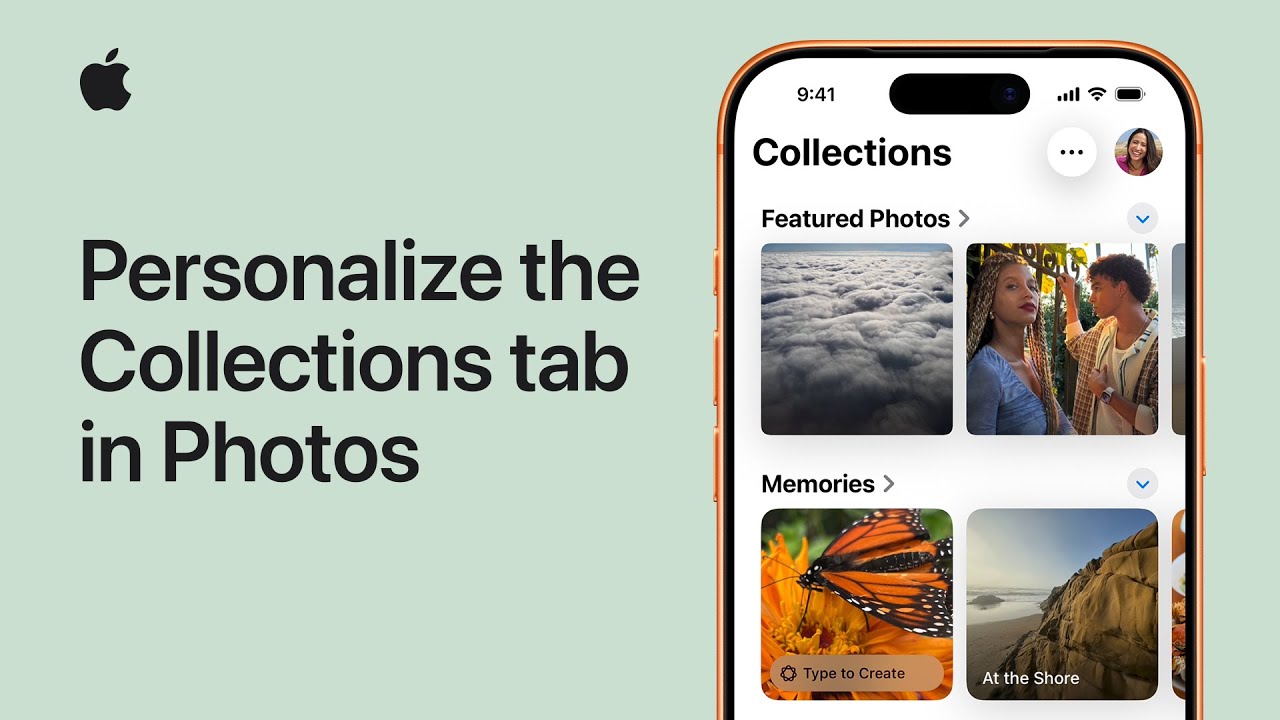
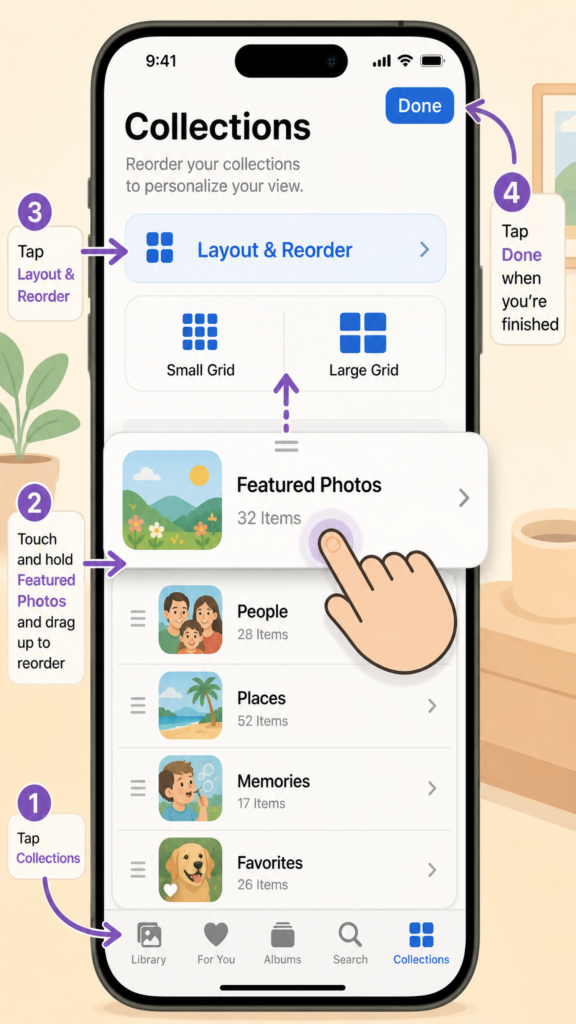
I open Photos and tap the Collections tab at the bottom of the screen. Then I tap Layout and Reorder to choose how my Collections appear.
I can select Small Grid to shrink thumbnails and see more collections, or Large Grid to make them bigger.
To reorganize, I tap Reorder, touch and hold a collection, drag it where I want—moving Featured Photos to the top—and release.
When I’m satisfied with the arrangement I tap Done to save my changes. That’s how I personalize the Collections tab so my photos display exactly the way I like for my daily browsing comfortably.
Open Photos and tap Collections.
Tap Layout and Reorder to choose Small Grid or Large Grid.
Tap Reorder, touch and hold a collection, then drag to reposition.
Move Featured Photos (or any collection) to the top as desired.
Shopping online can feel overwhelming when you can’t tell if glowing reviews are real or if that countdown timer is actually pressuring you into a bad decision. AI tools now offer a solution by scanning through product reviews and website claims to spot red flags that humans might miss. These systems look for patterns in language, check for suspicious details, and compare tactics against known fraud methods.
AI can process thousands of reviews to find fake patterns and identify common pressure tactics like “limited time offers” that scammers use to rush people into quick decisions. The technology examines word choices, timing of posts, and other clues that point to dishonest content. This helps shoppers make better choices without spending hours researching every purchase.
Understanding how these AI tools work gives you power as a consumer. When you know what to look for and how technology can help, you can shop with more confidence and avoid falling for common tricks that cost people billions each year.
AI tools analyze patterns in product reviews and website language to detect fake content and pressure tactics
These systems identify specific fraud indicators like urgency language, suspicious links, and manipulative offers
AI-powered fraud detection helps consumers make safer decisions but works best when combined with human judgment
Techniques for Detecting Fake Product Reviews With AI
AI systems use multiple approaches to identify fake reviews, from examining word choices and writing patterns to tracking reviewer activity and rating inconsistencies. These techniques work together to flag suspicious content that manual review processes might miss.
Analyzing Language Patterns and Repetitive Phrases
AI tools scan review text for unusual patterns that signal fake content. Natural language processing identifies when multiple reviews use identical phrases, similar sentence structures, or overly generic descriptions that lack specific product details.
Machine learning models examine word choice and grammar to spot differences between authentic and fabricated reviews. Research shows AI-generated fake reviews tend to be easier to understand but less specific than genuine ones. They often avoid concrete details about product performance or personal experiences.
The technology flags reviews with excessive promotional language or suspiciously perfect grammar. It also detects when groups of reviews repeat the same talking points using slightly different wording. These patterns emerge when paid reviewers or bots try to boost a product’s rating.
Detecting Anomalies in Reviewer Behavior
AI examines reviewer activity across platforms to find suspicious patterns. The systems track how often someone posts reviews, which products they rate, and the timing of their submissions.
Warning signs include accounts that post many reviews in a short period, reviewers who only rate products from one brand, or clusters of reviews appearing simultaneously for the same item. AI also flags reviewers whose ratings consistently differ from the majority opinion without reasonable explanation.
The technology builds relationship graphs connecting reviewers, reviews, and products. This reveals coordinated campaigns where multiple accounts work together to manipulate ratings. AI monitors whether reviewers have verified purchases and compares their activity against normal user behavior patterns.
Sentiment Analysis and Score Manipulation
AI measures the emotional tone in review text and compares it to the star rating given. Mismatches between positive language and low ratings, or negative complaints paired with high scores, trigger alerts.
The technology identifies when review scores cluster unnaturally. Authentic products typically show a range of ratings, while manipulated items often have suspiciously uniform five-star or one-star reviews.
AI tracks rating distributions over time to spot sudden spikes that don’t match sales patterns or product changes. It also flags reviews where the sentiment expressed doesn’t align with typical customer experiences for that product category.
Machine Learning Models for Identifying Fake Reviews
Supervised machine learning systems train on datasets of confirmed fake and authentic reviews. These models achieve approximately 90% accuracy in detection by learning distinguishing features from labeled examples.
The systems combine multiple data types:
Text features: Word patterns, review length, linguistic style
Network features: Connections between reviewers, products, and merchants
Deep learning techniques process this information simultaneously, updating their detection capabilities as new fake review tactics emerge. The models work continuously, scanning platforms in real-time rather than waiting for manual reporting.
How AI Evaluates “Limited Time Offer” Claims
AI tools examine whether “limited time offers” are genuine deals or manipulative tactics by analyzing language patterns, comparing promotion histories across multiple sites, and monitoring how countdown timers behave over time.
Recognizing Psychological Pressure Tactics
AI systems scan promotional text for specific markers that indicate pressure tactics. These markers include urgent language like “expires today” or “last chance,” along with scarcity claims such as “only 2 left in stock.”
The technology identifies common fraud indicators:
Time-sensitive phrases that create artificial urgency
Action-forcing language with imperatives like “act now” or “don’t miss out”
Consequence warnings about missing the deal
Emotional manipulation using fear or excitement
AI tools compare the intensity and frequency of these elements against known patterns from legitimate promotions. Fraudulent offers typically combine multiple pressure tactics in a single message. They also use more extreme language than standard marketing.
The analysis assigns confidence scores to each detected tactic. Higher scores indicate stronger likelihood of manipulation rather than a genuine offer.
Comparing Offer Timelines Across Websites
AI crawlers visit multiple websites selling the same product to verify if promotional claims match reality. The tools check whether a “24-hour sale” appears on competing sites or the same site repeatedly.
This process reveals several red flags. A retailer claiming an exclusive deal while competitors run identical promotions suggests coordinated deception. Prices that remain constant despite countdown timers indicate fake urgency.
AI maintains databases of historical pricing for products. These records show true price fluctuations versus artificial markdowns. Many sites inflate original prices to make discounts appear larger than they are.
The technology also monitors whether different customers see different deal timers. Personalized countdown clocks that reset for each visitor signal manipulation tactics rather than authentic limited inventory.
Tracking Recurring Promotions and Countdown Timers
AI monitors websites over weeks or months to detect patterns in promotional cycles. Tools record when countdown timers appear, what they display, and whether they actually end.
Many fraudulent sites display perpetual urgency. Their timers reset daily or show the same “final hours” message for months. AI flags these inconsistencies by comparing timestamps across multiple visits.
Common timer behaviors AI detects:
Timer Type
Legitimate Use
Fraudulent Use
Countdown clocks
End at stated time
Reset automatically
Stock counters
Decrease with purchases
Stay at low numbers
Sale end dates
Match advertised period
Extend indefinitely
The technology tracks whether promotions truly expire. Sites that continuously run “limited time” deals with different labels but identical discounts get marked as using pressure tactics. Real sales have defined start and end dates that merchants honor.
Benefits and Limitations of AI-Powered Authenticity Checks
AI systems offer strong protection against fake reviews and deceptive sales tactics, but they face real challenges in accuracy and adaptation. These tools excel at spotting patterns humans might miss, yet they can make mistakes and struggle to keep pace with new fraud methods.
Improved Consumer Protection and Trust
AI-powered verification systems analyze thousands of reviews in seconds to identify fake content before it reaches shoppers. Amazon’s system blocked over 200 million suspected fake reviews in 2022 alone, protecting customers from misleading information.
These tools examine multiple data points that humans can’t easily track. They look at review patterns, seller behavior, account history, and writing styles to spot suspicious activity. Machine learning models can detect if someone received a gift card or free product in exchange for a positive review.
The technology also helps identify pressure tactics on websites. AI can track how often a site claims to have “limited time offers” and compare pricing history to see if the urgency is real or fake.
Customers benefit from faster and more consistent protection than manual review processes could provide. The systems work 24/7 and don’t get tired or overlook warning signs.
Challenges in Avoiding False Positives
AI systems sometimes flag legitimate reviews as fake, which creates problems for honest customers and businesses. A product might get many quick reviews because the seller ran an effective ad campaign or offered a great price, not because the reviews are fraudulent.
Poor grammar alone doesn’t make a review fake, but some detection systems might incorrectly flag it. Real customers write in different styles and languages, which can confuse automated tools.
When AI blocks a genuine review, it frustrates the customer who took time to share their experience. Sellers also suffer when authentic positive feedback gets removed, potentially hurting their sales and reputation.
The challenge is that AI must make decisions based on patterns and probabilities. It lacks human judgment to understand context in every situation.
Final Thoughts
Fraudsters constantly develop new methods to trick AI detection systems. They change their writing patterns, use different accounts, and find creative ways to hide their true intentions.
AI models need regular updates and retraining to recognize new fraud techniques. What worked to detect fake reviews last year might not catch today’s sophisticated schemes. Bad actors study how detection systems work and adapt their approaches.
Deep graph neural networks help by analyzing complex relationships between accounts and behaviors, but determined fraudsters still find gaps. The technology requires ongoing investment and improvement to stay effective.
Companies must balance speed with accuracy when updating their systems. Rolling out changes too quickly might increase false positives, while moving too slowly leaves customers vulnerable to new scams.
Human investigators still play an important role when AI flags suspicious content but needs additional evidence before taking action.