

I open Photos, scroll to Utilities and tap Recently Deleted, then tap View Album and authenticate with Face ID, Touch ID, or my passcode.
I check the days remaining beside each photo or video because items older than 30 days are permanently deleted.
I tap Select, choose the photos or videos I want to recover, then tap the More button and pick Recover, confirming when prompted. To restore everything at once I tap Select, More, Recover All, and confirm Recover.
Finally I return to my library to find the recovered items back where they belong. Keep an eye on storage and back up.
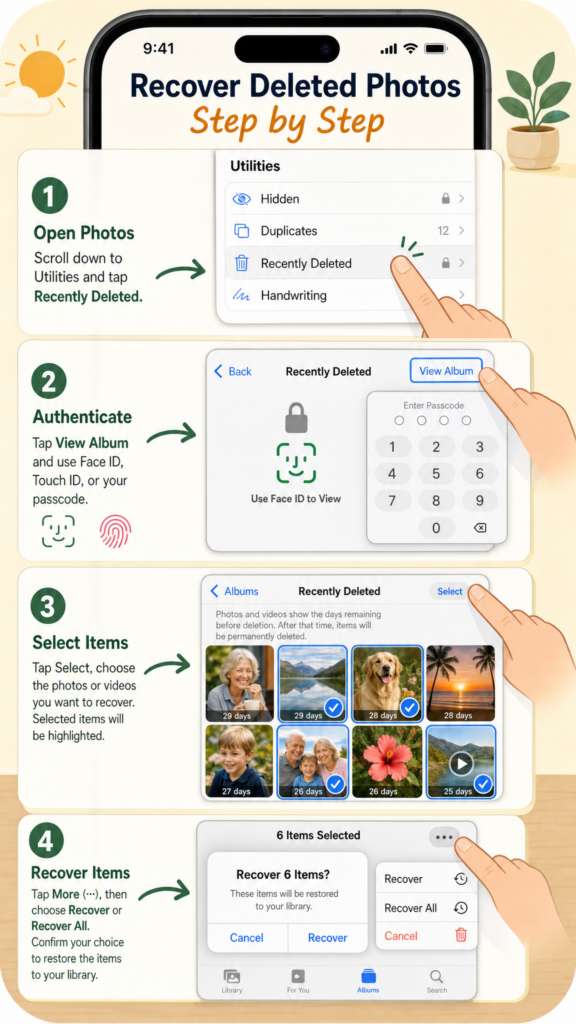
- Open Photos → Utilities → Recently Deleted and View Album.
- Authenticate with Face ID, Touch ID, or passcode.
- Check days remaining; items older than 30 days are permanently deleted.
- Tap Select, choose items, More → Recover (or Recover All) and confirm.
- Return to your library; consider backing up to avoid loss.