
Backing up your iPhone or iPad to your Mac keeps your data safe and easy to recover if your device is ever lost or replaced.
Start by connecting your iPhone to your Mac using a compatible cable. Click Allow if prompted, then open Finder and select your device in the sidebar.
Click Trust on your Mac, then tap Trust on your iPhone and enter your passcode.
To include Health and Activity data, check Encrypt Local Backup and set a password. Click Back Up Now and enter your passcode to begin.
Watch the progress bar until the backup completes successfully.
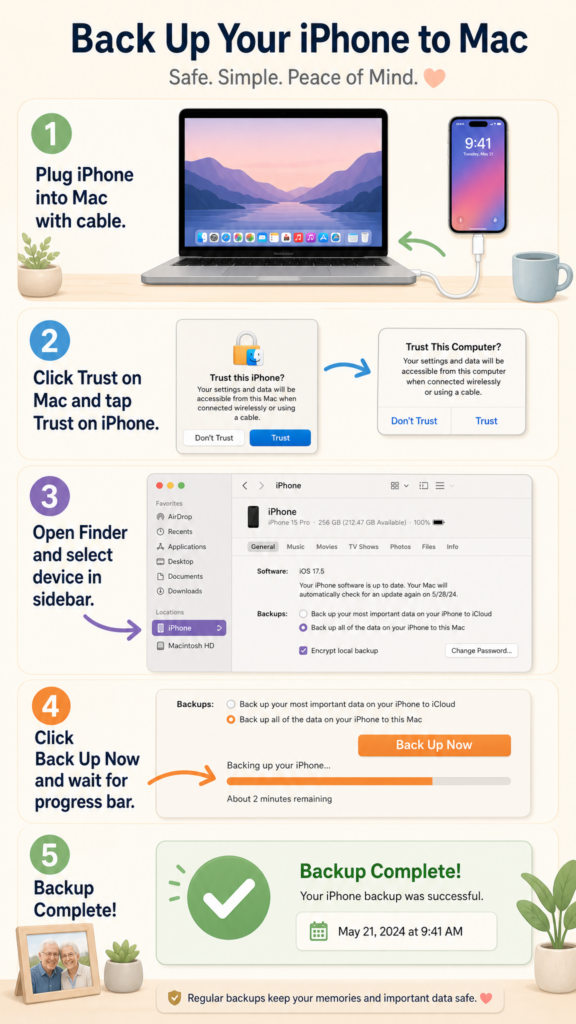
- Connect iPhone to Mac with a cable, then click Allow and Trust on both devices
- Open Finder and select your device in the sidebar
- To include Health data, check Encrypt Local Backup and set a password
- Click Back Up Now and enter your passcode to start
- Wait for the progress bar to complete — backup date and time will appear when done