
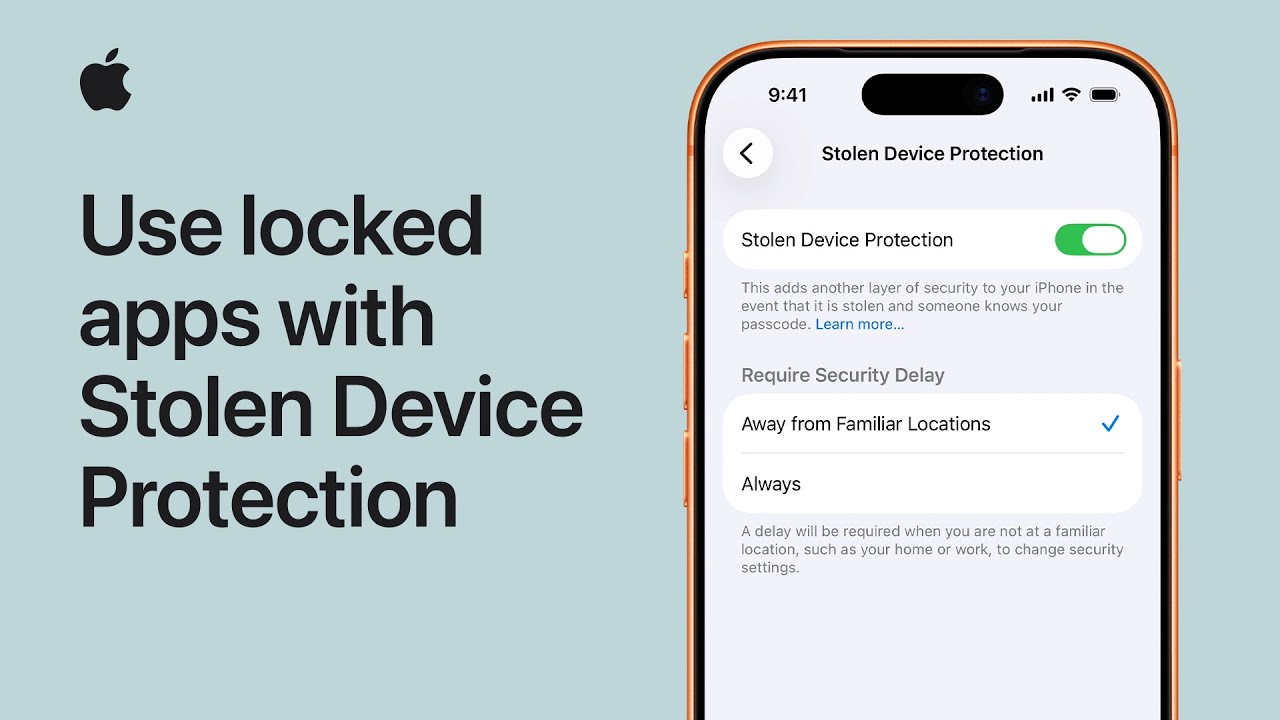
To protect your iPhone if it’s ever stolen, start by ensuring your device runs iOS 18 or later and has Face ID or Touch ID, two-factor authentication, Location Services, and Find My enabled.
Next, open Settings, go to Face ID and Passcode, enter your passcode, and turn on Stolen Device Protection. This adds extra security, such as requiring biometric authentication and delaying changes to sensitive settings when away from familiar locations.
You can also lock apps by pressing and holding an app, selecting Require Face ID or passcode, and authenticating. To unlock, repeat the process and disable the requirement when needed.
- Make sure your iPhone uses iOS 18+ and has Face ID/Touch ID, Find My, and 2FA enabled.
- Turn on Stolen Device Protection in Settings under Face ID & Passcode.
- This adds extra security like biometric checks and delays for sensitive changes.
- Lock apps by holding an app and selecting Require Face ID/Passcode.
- Unlock apps anytime by repeating the steps and removing the requirement.