
Travel can be exciting, but it can also feel stressful—especially with new places, unfamiliar streets, and different languages. The good news is that today’s phones and tablets include simple tools, powered by artificial intelligence (AI), that can guide you step by step.
In this guide, we’ll walk through AI map apps, easy directions, hotel reviews, and translation helpers in plain language. You don’t need to be “tech‑savvy.” You just need a bit of curiosity and a willingness to tap a few buttons.
Table of Contents
Key Takeaways
- AI map apps (like Google Maps, Apple Maps, or Waze) can show you where you are, where to go, and how to get there safely—by car, walking, or public transport.
- Step‑by‑step directions speak out loud and show large arrows on the screen so you don’t have to constantly read small text.
- AI‑powered hotel and restaurant reviews highlight the most important comments about cleanliness, safety, noise, and staff friendliness—saving you from reading hundreds of reviews.
- Translation apps can listen, speak, and even read signs or menus in another language, helping you communicate politely and clearly.
- You stay in control: you choose when to turn these tools on or off, and you don’t have to understand how the technology works inside—just how to use it.
What Is AI, in Simple Terms?
You will see the term AI often. Here’s an easy way to think about it:
- AI is like a very fast helper in your phone or tablet.
- It looks at lots of information, then tries to guess what you need next.
- It helps your apps give you smarter suggestions, such as the best route, the most helpful reviews, or the right words in another language.
You do not need to learn programming or anything complicated. You’ll just use easy apps that already have AI built in.
1. Using AI‑Powered Map Apps: Never Feel “Lost” Again
Most smartphones already include a map app:
- On many Android phones: Google Maps
- On iPhones: Apple Maps
- Some people also install Waze for driving
These apps can:
- Show your current location on a map
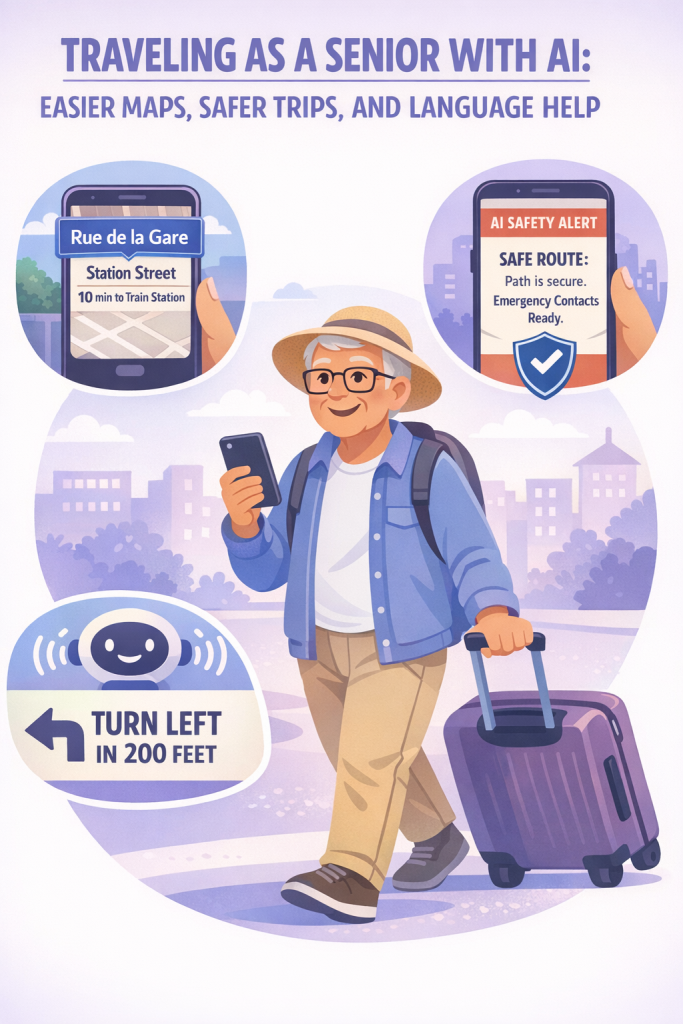
- Give step‑by‑step directions to a place
- Suggest safer or less busy routes
- Warn you about traffic, road closures, or accidents
How to Start a Route (Example: Google Maps)
- Open the Maps app
- Tap the map icon on your phone’s home screen.
- Tap the map icon on your phone’s home screen.
- Type or say your destination
- Tap the search bar at the top and type the name or address (for example, “Hilton Garden Inn Boston” or “123 Main Street”).
- Or tap the microphone icon and say, “Directions to the Hilton Garden Inn Boston.”
- Choose your mode of travel
- Look for icons for:
- Car
- Public transit (bus/train)
- Walking
- Sometimes biking or rideshare
- Tap the one you plan to use (for instance, walking).
- Look for icons for:
- Review the options
- The app may show several routes:
- Fastest
- Fewer transfers (if using trains/buses)
- Avoiding tolls or highways (you can adjust this in settings)
- Choose the one that feels most comfortable.
- The app may show several routes:
- Tap ‘Start’
- The app will begin speaking and showing arrows on the screen.
Helpful AI Features in Map Apps
Modern map apps use AI to make things easier:
- Real‑time traffic updates
The app sees where cars are slowing down and suggests a better route, so you don’t get stuck. - Safer routes
It can suggest well‑lit main roads instead of tiny side streets, especially at night (features vary by app and region). - “Nearby” suggestions
If you search for “restaurants,” AI helps show:- Highly rated places
- Options close to your hotel
- Filters like “wheelchair accessible,” “quiet,” or “family‑friendly” (depending on location)
Tips to Make Map Apps Easier to See and Hear
- Turn up the volume so you can hear directions clearly.
- Increase text size in your phone’s settings to make street names easier to read.
- Use a phone holder in the car so you’re not holding your phone while driving.
- If walking, pause in a safe spot (like a bench or shop entrance) to check the map instead of staring while crossing streets.
2. Step‑by‑Step Directions You Can Trust
Turn‑by‑turn directions are one of the best travel helpers for older adults.
What It Looks Like in Practice
Imagine you’re visiting your grandchildren in another city:
- You type their address into the map app.
- The app shows the route and estimates the time.
- As you drive, the app says:
- “In 500 feet, turn right on Maple Avenue.”
- “At the roundabout, take the second exit.”
- If you miss a turn, it calmly says, “Recalculating,” then gives new directions. No shame, no upset—just a new route.
How to Use Voice Directions Safely
- Before leaving, open the app and start the route while you’re parked.
- Make sure sound is on and loud enough.
- Keep your eyes mostly on the road:
- Listen to the spoken directions.
- Glance briefly at the screen only when safe.
- If you’re unsure, pull over safely and check the map.
Walking Directions for City Trips
Walking in a new city can be confusing. Map apps can:
- Show arrows where to turn
- Vibrate slightly right before a turn (on some phones)
- Re‑route you if you go the wrong way
A simple routine:
- Start your walking route at your hotel or apartment.
- Walk until the app says to turn.
- If you think you might be lost, stop somewhere safe (like a café entrance), check the map, and let the app recalculate.
3. Smarter Hotel & Restaurant Reviews: Let AI Do the Reading
Looking at hundreds of reviews on travel websites can feel tiring. AI can summarize and highlight patterns to help you quickly judge if a place is right for you.
How AI Helps With Reviews
Many travel and map apps now:
- Show overall scores (like 4.5 out of 5)
- Highlight common themes, such as:
- “Guests frequently praise the friendly staff.”
- “Many reviews mention the hotel is very quiet at night.”
- “Several guests mention the rooms are small but clean.”
- Sort reviews by:
- Most recent
- Traveler type (couples, families, solo, business)
- Specific concerns (cleanliness, location, staff)
AI looks at hundreds or thousands of reviews and pulls out what people talk about most, so you don’t have to read every single one.
What to Look For as an Older Traveler
When reading AI‑organized reviews, pay extra attention to:
- Safety and neighborhood
- Look for “safe area,” “felt comfortable walking at night,” or “close to main streets.”
- Accessibility
- Mentions of elevators, ramps, grab bars, or step‑free access.
- Noise levels
- “Quiet at night,” “thin walls,” “street noise,” etc.
- Cleanliness
- Notice if many people praise or complain about cleanliness.
- Staff helpfulness
- Comments about friendly, patient, or accommodating staff can make a big difference if you need assistance.
A Simple Review‑Checking Routine
Before you book:
- Check the overall rating (for example, 4.3/5 or above).
- Read the AI summary or “most mentioned” points.
- Scan 3–5 recent reviews:
- One very positive
- One average
- One negative
- Ask yourself:
- Will I feel safe here?
- Will I be able to move around easily (elevator, stairs)?
- Is it quiet enough for me to rest?
This lets AI do most of the heavy reading, while you just confirm the important details.
4. Translation Tools: Your Pocket Language Partner
One of the biggest worries when traveling abroad is language. AI translation tools can act like a calm, patient interpreter in your pocket.
Common examples include:
- Google Translate app
- Apple Translate (on iPhones)
- Translation built into some messaging or travel apps
These apps can:
- Turn your spoken words into another language
- Listen to someone else and show their words in your language
- Translate text from photos of signs, menus, or notices
Talking to Someone: Step‑by‑Step
Imagine you’re in a pharmacy abroad and need pain relief medicine.
- Open your translation app.
- Choose the languages, such as:
- From: English
- To: Spanish
- Tap the microphone and speak clearly:
- “I have a headache. What over‑the‑counter medicine do you recommend?”
- Show the translated text to the pharmacist, or press the speaker icon so the app says it out loud.
- When they answer, tap the microphone on their side, and the app will listen and show you the English translation.
You can take your time. It’s okay to repeat or correct a phrase.
Reading Menus and Signs
Most translation apps have a camera feature:
- Open the app and tap the camera icon.
- Point your camera at:
- A menu
- A train schedule
- A street sign or notice
- The app will try to overlay the translation on top of the image or show it below.
You can use this at:
- Restaurants
- Train stations
- Museums
- Tourist attractions
Simple Prepared Phrases
You can also prepare phrases in advance, such as:
- “I have a nut allergy.”
- “I walk slowly; please give me extra time.”
- “Where is the nearest taxi stand?”
- “Can you write that down for me?”
Save these in your notes or in the translation app’s favorites so you can show them quickly.
5. Staying Safe While Using AI Travel Tools
AI tools are helpful, but you still want to use them wisely.
Basic Safety Tips
- Don’t share too much personal information
Booking sites will need your name and payment details, but be cautious about sharing passport numbers or personal details in random apps or messages. - Use secure Wi‑Fi when possible
- Prefer your phone’s mobile data or a trusted hotel network.
- Be careful with free public Wi‑Fi in stations or cafés; avoid entering sensitive information like passwords or credit card numbers there.
- Keep your phone charged
- Bring a portable power bank if you’ll be out all day.
- Charge your phone fully each night.
- Know your hotel address offline
- Write your hotel’s name and address on a card and keep it in your wallet.
- Take a screenshot of your booking and save it in your photos, so you can show it even without internet.
Protecting Your Account and Data
- Use a screen lock (PIN, pattern, or fingerprint) so others can’t easily open your phone.
- Keep important apps updated, which helps with security and performance.
- If your phone is lost:
- Many devices let you locate, lock, or erase your phone from another device (ask a trusted family member to help set this up before traveling).
6. Practical Examples: How It All Comes Together
Sometimes it helps to see how these tools might work in real life.
Example 1: Visiting Family in Another City
- You save your family’s home address and the nearest grocery store in your map app favorites.
- When you arrive, you use the map for driving directions from the airport to their home.
- On another day, you use walking directions to get to a nearby café, with the app rerouting you when you take a wrong turn.
- At night, you use the map to call a trusted taxi service or guide a rideshare driver to your exact location.
Example 2: A Short Trip to a Foreign Country
- Before you go, you download:
- A map app with offline maps for the city (many apps let you save maps for use without internet).
- A translation app with your language and the local language.
- At the hotel, you use AI‑summarized reviews to choose a quiet, well‑rated restaurant nearby.
- At the restaurant, you:
- Use the camera translation to read the menu.
- Use voice translation to ask the waiter about allergens.
- When sightseeing, you use walking directions and public transit suggestions to move around confidently.
Final Thoughts
Travel in today’s world can feel complex, but you don’t have to face it alone. AI‑powered maps, smart reviews, and translation tools are like patient, knowledgeable companions in your pocket—ready to help you find your way, choose safe and comfortable places to stay, and speak politely in another language.
You don’t need to master every feature. Start with just one or two:
- Use a map app for voice directions.
- Try a translation app the next time you see a foreign sign or menu.
- Glance at AI‑summarized reviews before booking a hotel.
With a little practice, these tools can turn uncertainty into confidence and make your trips—near or far—more relaxed and enjoyable.